Take a binary apart.
A disassembler, a decompiler and a C++ class recovery engine. In one window, driven from the keyboard.
Klarion reads PE, ELF, Mach-O and raw images across twelve architectures — x86, ARM, RISC-V and MIPS. It recovers functions and control flow, lifts seven of the twelve to C pseudocode, and rebuilds class hierarchies straight out of RTTI, on binaries with no symbols at all.
The free edition is the whole engine. No account, no licence file and no expiry.
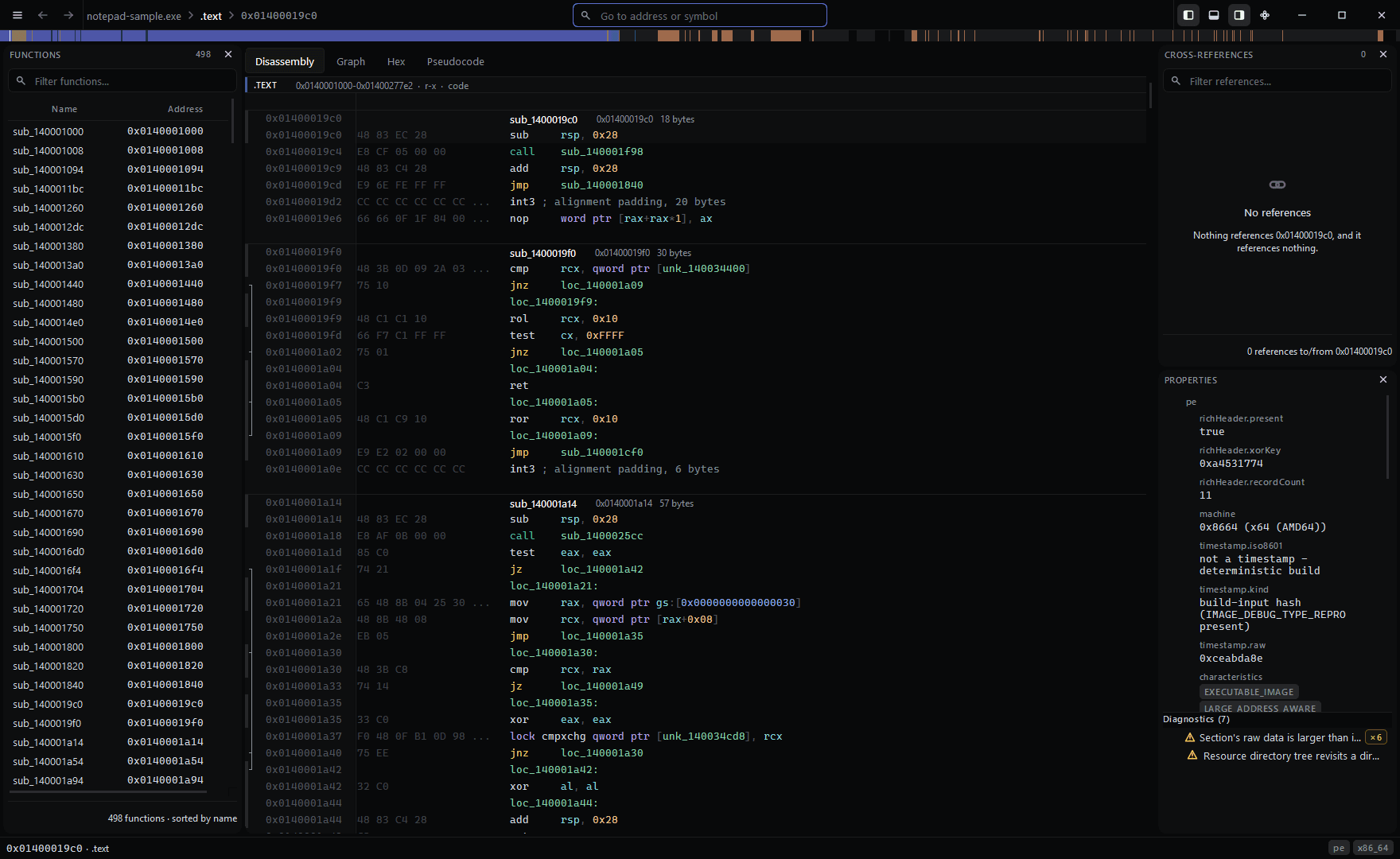
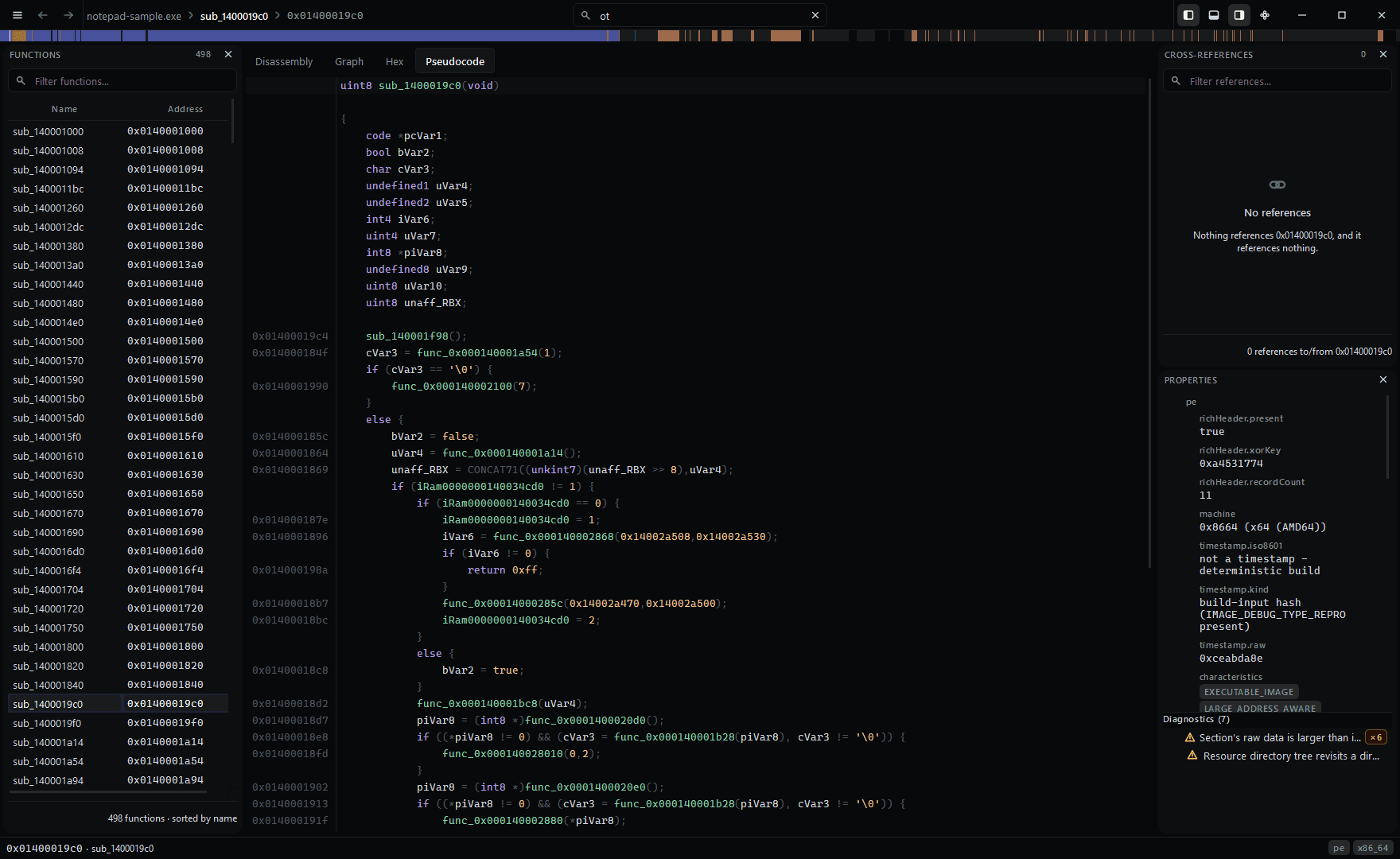
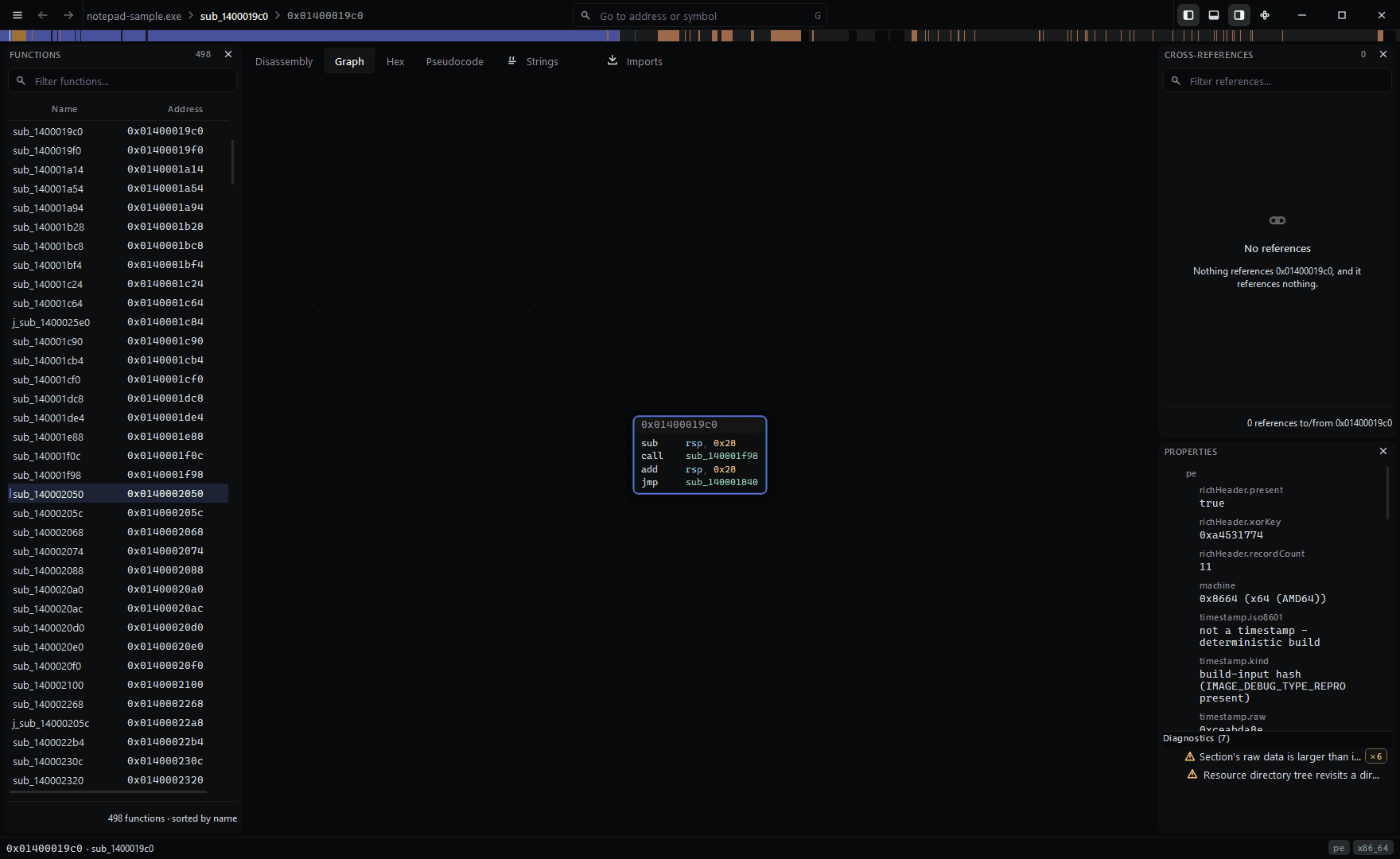
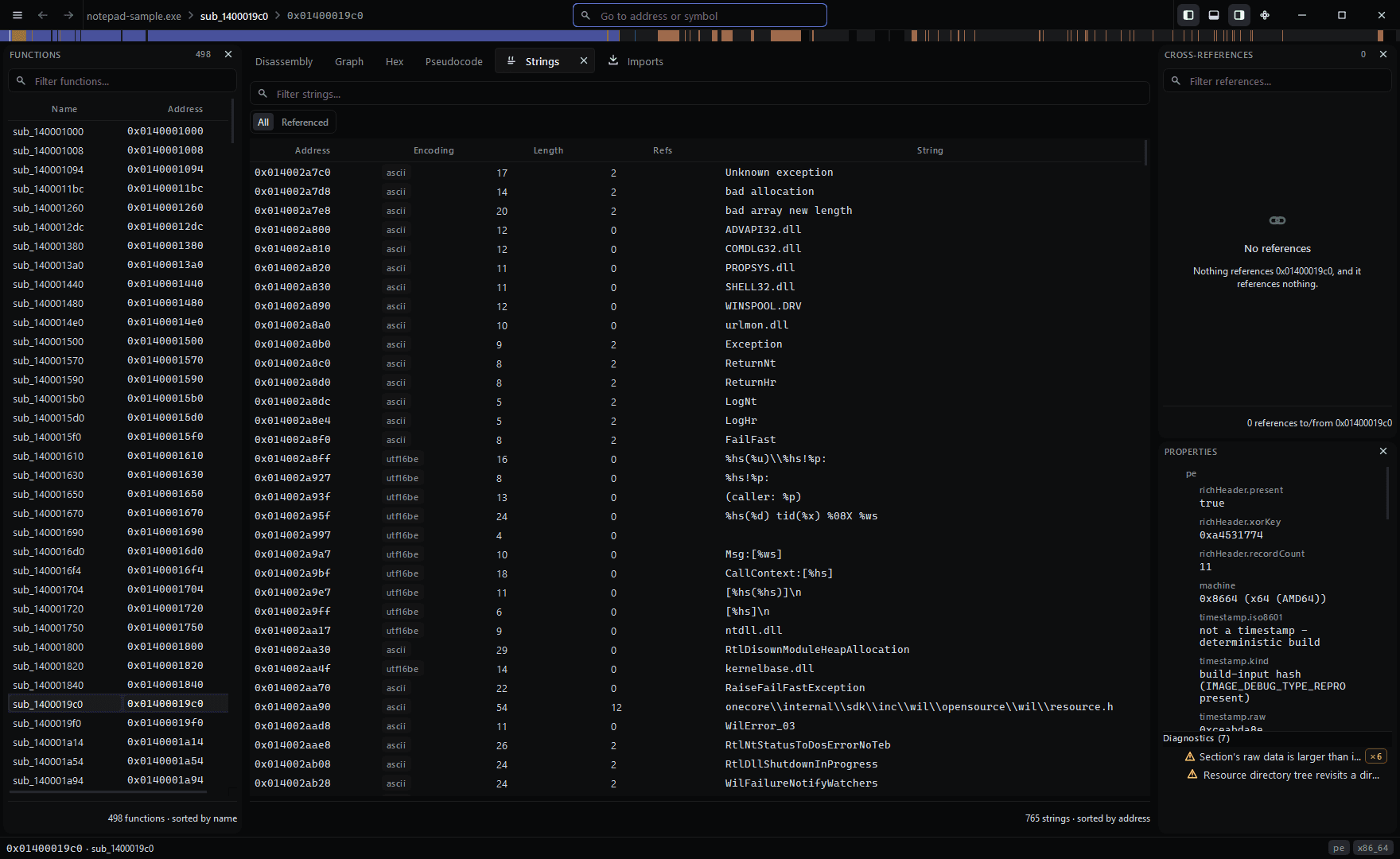
Decoded instructions, with cross-references and file properties alongside.
Reads, out of the box
Why this one
Three things that are usually extra.
Most of what follows is table stakes for a disassembler. These are the parts that normally cost more, arrive later, or never arrive at all.
- 01
A decompiler, and it says where it stops
Seven of the twelve architectures lift to C: x86, x86-64, AArch64, AArch32 in both ARM and Thumb state, and RISC-V 32 and 64. x86-16 and MIPS disassemble and say plainly that they have no pseudocode, rather than returning something that looks like an answer. Not a separate product, and not one architecture with the rest promised.
- 02
C++ classes out of a stripped binary
MSVC and Itanium RTTI is read straight from the image: class names, base hierarchies including virtual and multiple inheritance, and every vftable slot resolved to what it points at.
- 03
The whole engine in the free edition
Every loader, every architecture, the decompiler, the type editor and patching. What a licence adds is the automation: the command line, the MCP server, scripting, the Python module, binary diffing, signature generation and export.
Interaction
Built for the keyboard, not for a demo.
Every navigation, every edit and every view change has a key. A command palette covers all of them either way, so nothing is reachable only through a menu you have to remember the shape of. Every shortcut rebinds.
- Ctrl+P
- Go to anything: functions, symbols, strings, addresses
- Space
- Toggle the linear and graph views
- Tab
- Switch between disassembly and pseudocode
- X
- Show references to whatever is under the cursor
- N
- Rename
- ;
- Comment
- Ctrl+T
- Open the type editor
- Ctrl+Z
- Undo, across the whole session
Capabilities
What is in the build.
All of it is in the build you can download today. Nothing here is coming later.
Reading the binary
What Klarion works out on its own, before you have touched anything.
13 entriesLoaders
Every common container
PE32 and PE32+, ELF32 and ELF64, Mach-O including fat binaries, Intel HEX, Motorola S-record and raw images at a base address you choose. A loader claims a file by inspecting it, not by its extension, and a file nothing claims is reported rather than guessed at.
Disassembly
Twelve architectures, and an assembler for each
x86-64, x86 and x86-16 including real mode for firmware and boot code; AArch64, AArch32 in both ARM and Thumb state; RISC-V in 32- and 64-bit; and MIPS32 and MIPS64 in both byte orders, because big-endian MIPS is what most router and firmware images actually are. Every one of them assembles as well as disassembles, so a replacement instruction can be written in the mnemonic you would have typed. Instruction operands are resolved to symbols, structure members and stack variables rather than left as raw offsets.
Functions
Function and control-flow recovery
Entry points, exception directories, call targets, tail calls, jump tables and thunks, recombined into function boundaries with a basic-block graph. Indirect branches it cannot resolve are counted and reported instead of silently dropped.
Decompiler
C pseudocode with the addresses kept
Lifting to an SSA form, data-flow analysis, control-flow structuring and C-like output, for seven of the twelve architectures: x86, x86-64, AArch64, AArch32 in both ARM and Thumb state, and RISC-V in 32- and 64-bit. Every line carries the address of the instruction it came from, so the pseudocode and the listing are never two separate stories about one function. Where a type has not been recovered it says undefined8 rather than guessing at int, and where an architecture has no pseudocode yet — x86-16 and MIPS — it says that too rather than returning something that looks like an answer.
C++
Class recovery from RTTI
MSVC and Itanium run-time type information read straight out of the image: class names, base hierarchies including virtual and multiple inheritance and every vftable slot resolved to the function it points at. It works on a stripped binary because it is a scan of bytes rather than an analysis pass.
Names
Demangling that covers modern toolchains
MSVC and Itanium C++, Rust, Swift and Objective-C selectors recovered from runtime metadata. A name Klarion cannot demangle is left exactly as it found it rather than half-decoded.
Debug symbols
PDB and DWARF read in full
Point Klarion at a binary whose symbols you have and it reads them: PDB for anything built with MSVC, DWARF 2 through 5 for anything built with GCC or Clang. Functions get their real names and their real boundaries, parameters and locals get theirs, and source line numbers come across so a listing can say which line of which file it came from. A PDB is matched on both its identifier and its age, so a stale one from an earlier link is refused rather than quietly applied to addresses it no longer describes.
.NET
Managed assemblies read as managed
A .NET assembly is recognised as one, its types, methods, fields and strings are recovered from the CLR metadata, and its method names reach the listing. Just as importantly, the bytecode is marked as bytecode: a disassembler pointed at CIL will say so rather than presenting a confident x86 reading of something that was never x86.
Signing
Signatures checked, not just noticed
Where a file carries an Authenticode signature, the image is hashed the way the signature says it was and compared against what was signed, so a binary altered after signing is identified as altered. It reports whether the contents still match, and states plainly that it has not evaluated the certificate chain — a tampered file and an untrusted publisher are different questions, and only the first is answerable from the file alone.
Signatures
Library code identified, not guessed
A memory-mapped signature database matches statically linked library functions and reports the library, version and compiler each match came from, so you can judge it rather than take it. Matching never overwrites a name you set.
Obfuscation
Flattened control flow, recognised and undone
A function whose graph has been flattened into a switch is identified as flattened rather than left looking like a disassembler failure, and on request the original control flow is rebuilt: the dispatcher removed, each block joined to the one its state variable selects, and conditional moves recovered as the two-way branches they were. Blocks whose next state cannot be resolved keep their original edges and are listed, because a rebuilt graph that hides what it could not work out is worse than no rebuild. Branches proved to always go one way are reported with the comparison that proves it.
Entropy
Packing and key material at a glance
A whole-file entropy profile covers the entire file rather than a sample, so compressed regions, embedded archives and high-entropy blobs are visible before you read a single instruction.
Strings
Strings with their references
ASCII, UTF-8, UTF-16 both endiannesses, with the encoding, the length and how many places reference each one. Filter to referenced-only to skip the noise a compiler leaves behind.
Working through it
The part you spend eight hours a day in. Everything is keyboard-first; the mouse is for the graph.
8 entriesViews
Listing, graph, hex and pseudocode
One function, four ways, switched with one key each. The hex view carries a data inspector that reads the bytes under the cursor as every primitive type at once, including a timestamp and a pointer.
Panels
Seventeen panels, each on its own key
Thirteen open as tabs beside the listing: search, strings, imports, exports, symbols, segments, bookmarks, entropy, types, comments, the call tree, snapshots and scripts. Four more — the functions list, cross-references, properties and the output drawer — dock instead, so those you can drag to another edge, tear onto a second monitor or close entirely. The layout is remembered and can be saved as a named arrangement.
Types
A real type editor
Structures, unions, enumerations, typedefs, function prototypes and calling conventions, with correct layout for both Windows and System V data models. Apply a type at an address and the listing, the pseudocode and the hex view all follow it.
Navigation
A command palette that covers everything
Every command in the application is discoverable and rebindable from one search box, including the ones you would otherwise have to remember a menu shape for. Go-to accepts an address, a symbol, a function name or an expression.
Cross-references
References both ways
Everything that reaches an address and everything that address reaches, for code and for data, updated as analysis refines its answer.
Editing
Rename, comment and annotate, with full undo
Every edit records whether it came from you, from analysis, from a plugin or from an import, and analysis is never permitted to overwrite one of yours. Undo and redo cover the whole session, and named snapshots let you return to a point you liked.
Patching
Patching with verified write-back
Assemble a replacement instruction, or edit bytes directly, and write the result back to a copy of the file. The written image is read back and checked rather than assumed.
Projects
One project file
Every name, comment, type, bookmark, patch and snapshot in a single file you can copy, back up or hand to a colleague.
Running it without a person
The automation surface. Included with Klarion Pro and Klarion Team.
6 entriesCLI
Headless analysis with JSON output
Functions, imports, exports, symbols, segments, sections, strings, cross-references, byte and string search and a complete machine-readable dump, every one of them emitting JSON, so Klarion drops into a pipeline without a scraping layer.
MCP
An agent can drive the same engine
An MCP server over JSON-RPC exposes the analysis engine to a model the way the window exposes it to you. The handful of tools that change the project say so in capitals; scripting stays unregistered unless you explicitly allow it.
Scripting
Embedded Lua, sandboxed on purpose
A flat read-and-write API over the analysis model. There is no filesystem access, no process spawning and no sockets, and a runaway loop is interrupted on a wall-clock budget rather than hanging the window.
Python
Importable from your own Python
An extension module your interpreter loads, so a notebook, a CI job or a script you already have reaches the engine with one more import rather than moving into a console of ours. It binds the same operations the embedded engine does, under the same names, returning the same records. It runs with your privileges, like every other library you import, and says so.
Signatures
Build your own signature databases
Generate signatures directly from a static library: thousands from a single archive, produced rather than curated by hand, so your own in-house libraries are identified the same way the C runtime is.
Export
Get the results out
C headers for recovered types, JSON for everything and disassembly listings, so the analysis can be consumed by whatever comes next.
Working as a team
Included with Klarion Team.
2 entriesServer
A server you host yourself
Your machine, your data, no account with us anywhere in the path. It works like a git remote for analysis: everyone keeps a working copy and changes travel as facts rather than as file diffs, so two people renaming different functions never conflict.
History
Who decided what
Every change is attributed and timestamped, so a name you disagree with can be traced to the person who chose it and the point at which they did.
Editions
The free edition is not a demo.
Klarion Free is the whole engine: every loader, every architecture, the decompiler, RTTI recovery, the type editor, patching and project files. What it does not have is the command line, the MCP server, scripting, the Python module, binary diffing, signature generation and export, which are the ways to run Klarion without a person in front of it. That is what a licence buys.
Klarion Free
The whole analysis engine, for non-commercial work. No account.
Free
No sign-up, no licence file, no expiry.
- Every loader and every architecture
- Decompiler and C pseudocode
- C++ class recovery from RTTI
- Type editor, patching, project files
- No account, no expiry
Klarion Pro
Most boughtCommercial use, the command line, scripting and the MCP server.
$149$249
One named user. Yours forever, with 12 months of updates.
- Commercial use
- Command line and JSON output
- MCP server
- Embedded Lua scripting and plugins
- Python module you can import
Klarion Team
Pro for five people, plus the self-hosted collaboration server.
$599$999
Five seats. Yours forever, with 12 months of updates.
- Self-hosted team server
- Shared project store and live sync
- Per-analyst attribution and history
Early-access pricing. Buy now and renewals stay at this price for as long as you keep the licence.
Full comparison · Government pricing · Offline activation for air-gapped machines is included with every paid edition.
Open a binary.
Klarion runs on Windows 10 and 11, 64-bit. The free edition is a download and nothing else.
Every build ships with its SHA-256